Current Time: November 11, 2025 08:19 AM +07 X Handle: @michelini Country: Thailand TH
What Is a Google Knowledge Panel?
A Knowledge Panel is Google’s enhanced info box that appears on the right side of search results when someone searches your name. It includes:
- Your photo
- Short bio
- Social media links
- Related content (videos, podcasts, articles)
- Website and contact info
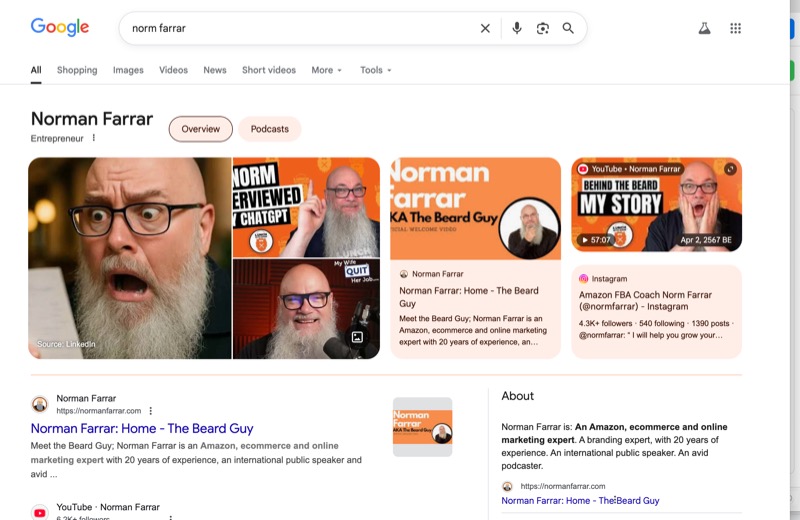
Real example: A fully built Knowledge Panel (name blurred for privacy). This is what you’re aiming for.
It’s not paid, not guaranteed, but 100% achievable with the right strategy.
Why You Want a Knowledge Panel
- Instant Credibility: Looks like Google “vouches” for you
- Higher Click-Through: Up to 30% more clicks vs. plain results
- Brand Control: You decide what info shows first
- SEO Boost: Helps rank for your name and related terms
5 Steps to Get Your Own Panel
-
Claim Your Identity on Google
Search your name → Click “Is this you?” or “Claim this knowledge panel” → Verify via email or phone. -
Build a Personal Website (Your Digital Hub)
Use your full name in the domain (e.g., yourname.com) and include:- Clear bio
- Professional photo
- Contact info
- Links to social profiles
-
Add Structured Data (Schema Markup)
Tell Google exactly who you are with Person schema:<script type="application/ld+json"> { "@context": "https://schema.org", "@type": "Person", "name": "Your Full Name", "jobTitle": "Your Profession", "url": "https://yourname.com", "image": "https://yourname.com/photo.jpg", "sameAs": [ "https://x.com/yourhandle", "https://linkedin.com/in/yourprofile" ] } </script>Use Schema Markup Generator → Paste in of your site
-
Be Active on High-Authority Platforms
Create and verify profiles on:- YouTube (upload intro video)
- LinkedIn (complete profile)
- X / Twitter
- Instagram or TikTok (if visual)
- Wikipedia (only if truly notable)
-
Earn Mentions & Backlinks
Get featured in:- Podcasts
- Guest blog posts
- News articles
- Industry directories
Each mention strengthens your entity signal.
Google’s Algorithm: What Triggers a Panel?
Signal
Why It Matters
How to Build It
Entity Consistency
Same name, photo, bio everywhere
Use exact same branding on all platforms
Structured Data
Machine-readable identity
Add Person schema to your site
Search Volume
People search your name
Promote your brand → get known
Authority Links
Trusted sites mention you
Guest posts, PR, podcasts
Engagement
Users click, stay, share
Create valuable content
Timeline: When Will It Appear?
- Week 1–2: Set up site + schema + claim panel
- Month 1–3: Build social profiles + get 5–10 mentions
- Month 3–6: Panel likely appears (if signals are strong)
Google updates panels weekly. Keep content fresh!
Your 30-Day Action Plan (@michelini)
- Buy michelini.com (or .co/.io)
- Create 1-page site: Bio, photo, X link, schema
- Search your name → Claim Knowledge Panel
- Post 3 X threads about your expertise
- Reach out to 1 podcast for a guest spot
Do this consistently → panel in 3–6 months.
Verify in Google Search Console • Get Person Schema • Follow @michelini
Comments
Approved comments appear below. Log in once with GFAVIP — it applies across the whole site. GFAVIP login
View comments archive