GrokBot Field Manual
The setup order, the swarm patterns, and the mistakes that eat your quota. Transcribed from the three-page carousel so it is searchable — then mapped onto the desk we already run.
GrokBot TOC · ← AI Agents · Productivity · GrokBot overview · GrokBot tips · GrokBot CEO · GrokBot course · Gym hack · SEO agent · Limits · Team
Source
Recirc that sent us here: 0xMarioNawfal / Roundtable (@RoundtableSpace) — x.com/RoundtableSpace/status/2092654556748337186 (26 Aug 2026). “This is the best written Grok Bot guide that you will find.” ~1.3k bookmarks / ~67k views at capture. Three-page carousel. Credit on the tweet: @Argona0x.
Header on the slides: Grok Bot Field Manual · rev 1.2 · August 2026 · “compiled from 40+ operator setups, the official docs and xAI’s public tip threads.” That last clause is the Ben Lang team list plus docs.x.ai/grok-bot.
This page is a verbatim transcription of the three images, then our study notes. Steal the operating system. Do not import Argona’s separate Polymarket / token posts — those are a different artifact, and the $50 → $5,273 clip already has a Community Note.
The original slides


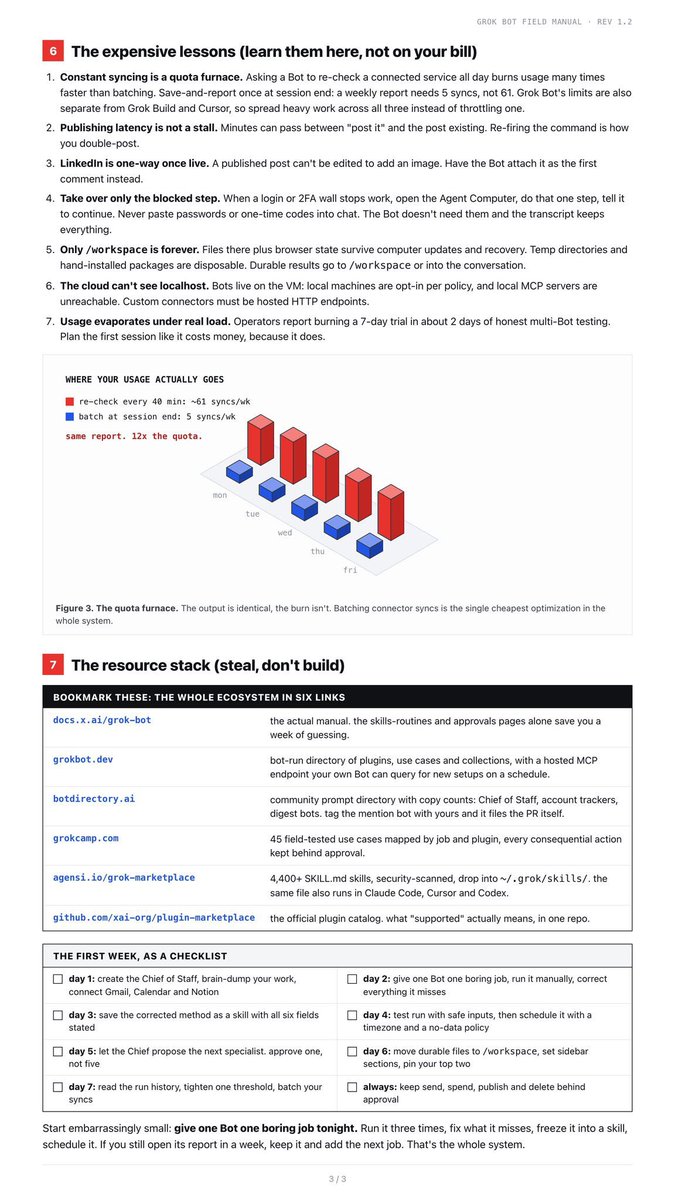
One-sentence TL;DR
One shared cloud computer under every bot, one Chief first, run the job by hand until it is boring, freeze it as a skill, schedule it, keep send/spend/publish behind approval, and batch connector syncs or the quota furnace eats the week.
Slide intro (verbatim)
Most people run Grok Bot like a chatbot with extra steps: one mega-chat, no skills, no schedules, quota gone by Wednesday. The operators getting real work out of it converged on the same operating system. This file is that system: the mental model, the setup order, the swarm patterns and the expensive lessons, written down so you only pay for them once.
1 · The mental model (skip this and stay stuck)
- One computer, many screens. Every Bot you create shares ONE persistent cloud computer: a managed Linux VM with a browser, filesystem and terminal. Each Bot gets its own screen so they work in parallel, but underneath they share files, browser cookies, signed-in sessions and command-line credentials. The screens are work surfaces, not security boundaries. Sign in to a site once and every Bot can use it. Which also means a sketchy imported skill runs one hop away from your most sensitive login. Trust accordingly.
- The ladder never skips a rung. The reliable path is fixed: one-time task → corrected task → saved skill → tested routine → team. Run the job manually first. Correct it. Only when the method survives contact do you freeze it as a skill and put it on a schedule. Every horror story you’ve read started with someone scheduling attempt #1.
- A Bot is a job, not a project. “General Helper” builds context that transfers to nothing. “Talent Scout”, “Expense Manager”, “Bug Repro” each accumulate memory, files and preferences that compound for months. Put durable rules in the Bot’s description (“never send external messages without approval”) and task details in the conversation. The description survives, the chat scrolls away.
Figure 1 caption (verbatim): One VM under every Bot. Shared files,
shared sessions, shared credentials. Handy for handoffs, risky if you
install random skills without reading them. Diagram: one shared
cloud computer (every bot · one VM · parallel screens) under Scout /
Inbox / Chief / Content / Ops. Shared layer labeled
/workspace files, browser sessions, logins + CLI creds.
Callout: screens ≠ security boundaries.
Reply on the Roundtable tweet worth keeping: @0xAndyZhou — “One bot per job beats one bot with ten skills, for a boring reason: when something goes wrong you want a single narrow scope to inspect. Broad bots make every failure a search problem.”
2 · The setup order (most people do it backwards)
- Create ONE Bot first: the Chief of Staff. Not five. xAI’s own enterprise GTM playbook and every setup that survived week one starts with a single coordinator that owns the roster.
- Reverse-prompt the team into existence. Brain-dump everything about your work into the Chief: projects, tools, recurring chores, deadlines. Then ask it to review your connections and propose the 3 most useful specialists, plugins and automations. Approve, don’t invent. Then run it one level down and ask which routines each new Bot should own.
- Connect plugins in pain order. Gmail, Calendar and Notion are one-click OAuth. GitHub is secretly TWO paths: a Cursor-side link plus Grok Bot’s own connector that still wants a personal access token. One green checkmark does not cover both. X wants a developer bearer token, so budget 10 minutes for it or skip it until the rest works.
- Make the roster livable. Pin your top 2 Bots, group the rest into sidebar sections, and have a Bot generate avatars for the whole team. Sounds cosmetic, but you end up actually messaging the bots that have faces.
3 · Skills: teach, don’t type
- “Teach a task” beats prompt engineering. Open a Bot’s computer view, hit Teach a task, and do the job yourself once. It records up to 10 minutes of visible screen work (no microphone) and writes the skill draft for you. One demonstration replaces an evening of describing buttons. Keep secrets out of frame and use the secure handoff for credentials.
- The draft is not the skill. A learned skill ships
without judgment. Harden it until it states six things:
- when to use it
- required inputs and access
- the exact sequence
- how to validate the result
- what to return
- what requires approval
- Skills are account-wide, enablement is per-Bot. If a
saved skill doesn’t show up in the
/menu, it’s not broken. Enable it for that Bot under Settings → Plugins → Yours. Composer grammar:/references skills,@mentions Bots, groups, routines and connectors.
4 · Routines without regret
- A test run performs REAL work. It clicks real buttons, changes real files, spends real quota. Test with safe inputs and keep write actions behind approval. “Test” is not a sandbox.
- The limits nobody reads: 50 Bots and group chats combined per account, 50 routines per Bot, only the last 20 runs kept per routine. Deleting a routine has no undo, deleting a Bot deletes its routines with it, and long-idle routines auto-pause until you answer for them.
- Write the boring policies up front. Owner, schedule, timezone, input source, output destination, approval boundary. Add what to do on missing data (report the failure, never quietly reuse stale data) and make retries idempotent so a re-run can’t double-send.
- Autonomy is a dial. Approvals can be allow-once, deny, or Always Allow, and a require-approval rule beats an always-allow when both match. Full autopilot (Always Allow plus Auto Review off) exists. Earn it by watching runs first, then flip it per workflow, not globally.
- Routines can fire on events, not just schedules. A Slack message or a GitHub notification can start the job through account integrations (a separate connection from the plugins themselves).
Figure 2 caption (verbatim): The compounding ladder. Value comes from freezing corrected work into skills and letting routines and teams re-run them for free. Header on the diagram: “THE LADDER: NEVER SKIP A RUNG / reliability compounds left to right.”
| Rung | What it is |
|---|---|
| TASK | You do it once |
| CORRECTED | Fix the misses |
| SKILL | Method frozen |
| ROUTINE | Runs itself |
| TEAM | They run each other |
5 · Swarm patterns (from people running 6+ Bots)
- Never let a Bot grade its own work. The Bot that produced a signal is the worst possible judge of it. Separate producer from reviewer, give the reviewer the confirmation rules, and let it kill the handoff. High-conviction output requires two Bots agreeing independently.
- A handoff carries five things: the artifact, the evidence, status, blockers, next action. Anything less and the receiving Bot reconstructs reality from chat history, and that’s how drift starts. One owner per stage. Group chats (2 to 6 Bots) only when the handoff itself must be visible.
- Stopping conditions a Bot can’t fake. “Done” must be checkable by something other than the Bot’s own claim: a file exists at a URL, a JSON field crossed a threshold, a PR opened. Never trust “the bot says it ran.”
- Let false positives rewrite the instructions. When output is weak, message the specific Bot that produced it with the correction (“you flagged 12, only 2 had real news, tighten the threshold”). Thirty iterations later the swarm holds institutional knowledge no single prompt could.
- Give the swarm its own identity. An agent email inbox (AgentMail-type plugins) lets Bots register for accounts without burning your inbox. Tailscale turns your machines into one private network Bots can reach when you explicitly route work to them.
6 · The expensive lessons (learn them here, not on your bill)
- Constant syncing is a quota furnace. Asking a Bot to re-check a connected service all day burns usage many times faster than batching. Save-and-report once at session end: a weekly report needs 5 syncs, not 61. Grok Bot’s limits are also separate from Grok Build and Cursor, so spread heavy work across all three instead of throttling one.
- Publishing latency is not a stall. Minutes can pass between “post it” and the post existing. Re-firing the command is how you double-post.
- LinkedIn is one-way once live. A published post can’t be edited to add an image. Have the Bot attach it as the first comment instead.
- Take over only the blocked step. When a login or 2FA wall stops work, open the Agent Computer, do that one step, tell it to continue. Never paste passwords or one-time codes into chat. The Bot doesn’t need them and the transcript keeps everything.
- Only
/workspaceis forever. Files there plus browser state survive computer updates and recovery. Temp directories and hand-installed packages are disposable. Durable results go to/workspaceor into the conversation. - The cloud can’t see localhost. Bots live on the VM: local machines are opt-in per policy, and local MCP servers are unreachable. Custom connectors must be hosted HTTP endpoints.
- Usage evaporates under real load. Operators report burning a 7-day trial in about 2 days of honest multi-Bot testing. Plan the first session like it costs money, because it does.
Figure 3 caption (verbatim): The quota furnace. The output is identical, the burn isn’t. Batching connector syncs is the single cheapest optimization in the whole system. Same weekly report, two ways: re-check every 40 min ≈ 61 syncs/week (red). Batch at session end = 5 syncs/week (blue). Overlay: same report. 12× the quota.
One reply on the Roundtable tweet: @generictokens says local MCP can be reached through Cursor CLI (they tested talk-to-figma). Treat that as an extra hop, not a contradiction of “the Bot VM cannot see your laptop’s localhost.” Two computers.
7 · The resource stack (steal, don’t build)
As printed. Our notes in the last column.
| Link they printed | Their one-liner | Our note |
|---|---|---|
| docs.x.ai/grok-bot | The actual manual. The skills-routines and approvals pages alone save you a week of guessing. | Start here. Approvals page is the source for tip 6. |
| grokbot.dev | Bot-run directory of plugins and collections, with a hosted MCP endpoint your own Bot can query for new setups on a schedule. | Third-party directory. Inspect before you let a bot install from it. |
| botdirectory.ai | Community prompt directory with copy counts: Chief of Staff, account trackers, digest bots. Tag the mention bot with yours and it files the PR itself. | Open-source prompts (elie222/botdirectory.ai). Copy, don’t blindly schedule. |
| grokcamp.com | 45 field-tested use cases mapped by job and plugin, every consequential action kept behind approval. | Operator catalog, not official xAI. |
| agensi.io/grok-marketplace | 4,400+ SKILL.md skills, security-scanned, drop into ~/.grok/skills/. The same file also runs in Claude Code, Cursor and Codex. | Third-party skill dump. The field manual itself said don’t install sketchy skills next to your logins. |
| github.com/xai-org/plugin-marketplace | The official plugin catalog. What “supported” actually means, in one repo. | This is Grok Build’s marketplace, not a Grok Bot app store. Same xAI org, different product. Useful anyway if the bot is driving the coding CLI. |
The first week, as a checklist (verbatim)
| Do this | |
|---|---|
| Day 1 | Create the Chief of Staff, brain-dump your work, connect Gmail, Calendar and Notion |
| Day 2 | Give one Bot one boring job, run it manually, correct everything it misses |
| Day 3 | Save the corrected method as a skill with all six fields stated |
| Day 4 | Test run with safe inputs, then schedule it with a timezone and a no-data policy |
| Day 5 | Let the Chief propose the next specialist. Approve one, not five |
| Day 6 | Move durable files to /workspace, set sidebar sections, pin your top two |
| Day 7 | Read the run history, tighten one threshold, batch your syncs |
| Always | Keep send, spend, publish and delete behind approval |
Start embarrassingly small: give one Bot one boring job tonight. Run it three times, fix what it misses, freeze it into a skill, schedule it. If you still open its report in a week, keep it and add the next job. That’s the whole system.
How this maps here
| Manual | Our notes |
|---|---|
| One computer, screens ≠ security | /grokbottips tip 6 · official Auto-review docs. Same blast-radius as /gymhack. |
| Chief first, reverse-prompt the roster | /grokbotceo · /grokbotcourse (Amrita live-builds this) |
| Job-named bots, not General Helper | Ben tip 2 + 10 on /grokbottips. Corey’s six named bots. |
| Ladder: task → skill → routine → team | Course “teach a skill” + “never cron attempt #1.” Ben tip 4/9: hourly is plenty, never every 5 minutes. |
| Six-field skill + Require Approval | The product version of “draft only.” Don’t Always Allow send. Teach-a-task: keep secrets out of frame; use the secure handoff for credentials. |
| Never let a bot grade its own work | /grokbothedgefund Coordinator as checker over five makers |
| Quota furnace / 7-day trial in 2 days | Ennis herdr + lantern on /grokbottips: don’t burn Grok Bot usage on codegen. Limits are separate from Grok Build / Cursor. |
Only /workspace survives | Matches the herdr-on-the-bot-VM wipe note: reinstall CLIs, keep durable files in /workspace. |
| Human publish, don’t double-post | /grokbotx · /grokbotsocial |
What we keep vs skip
- Keep: shared-VM mental model, Chief first, the ladder,
six-field skills, maker-checker, batch syncs,
/workspace, send/spend/publish behind approval, secrets out of frame during Teach, week-one checklist. - Verify before you copy: GitHub’s two connectors, X bearer-token step, 50/50/20 limits (those move with the product).
- Skip mixing in: Argona’s “pay for yourself or you die” Polymarket clip and the follow-on token. Different post, Community Noted, not this manual. The field manual is the useful artifact.
- Don’t treat the six-link stack as official. Only docs.x.ai and the xai-org plugin repo are first-party, and the plugin repo is Grok Build.
Related on this site
- GrokBot tips — team list + Auto-review expansion + herdr/lantern
- GrokBot CEO — the Chief this manual says to hire first
- GrokBot course — official workshop: teach, routines, always-ask-first
- GrokBot — platform + 100 use cases
- GrokBot hedge fund — producer ≠ reviewer
- GrokBot X · GrokBot social — human still hits publish
- GrokBot + Postbridge — latency ≠ stall; don’t double-post the fan-out
- Gym hack — what write access looks like with no fence
- GrokBot as an SEO agent — 20 local prompts; don’t paste them into a mega-chat
- GrokBot org — channels vs sidebar sections; 50-bot cap is why folders matter
- GrokBot limits — spread the furnace onto Cursor/Codex/Build via herdr
- GrokBot team — Lauren Tan: CI as the manager, not 15–25 untitled chats
- Codex Fast vs Medium — the other usage meter
Primary: @RoundtableSpace — field manual recirc · credit @Argona0x · docs.x.ai/grok-bot
Field notes · August 2026 · Rev 1.2 transcribed · One boring job tonight · Roundtable carousel
Comments
Approved comments appear below. Log in once with GFAVIP — it applies across the whole site. GFAVIP login
View comments archive