Sync Your Fork with the Upstream (Core) Repository
Keep your forked project up-to-date with the main/core repository — clean & conflict-free workflow
Why Sync Regularly?
When you maintain a fork (your own copy) of a core/main repository, the original project keeps moving forward. Syncing brings in bug fixes, new features, and improvements while preserving your custom configurations.
Step-by-Step Sync Workflow
- Make sure you're on your main branch
git checkout main - Fetch the latest commits from the upstream (core) repository
git fetch upstream - (Recommended) Preview what you're about to merge
git log upstream/main --oneline --graph --decorate ^main - Merge the upstream changes into your current branch
git merge upstream/mainPossible results:
Already up to date→ nothing new from core- Fast-forward → clean automatic update (most common)
- Merge commit → automatic
- Conflicts → manual resolution needed (see below)
When You Get Conflicts (rare if you only change config files)
<<<<<<< HEAD
your custom code stays here
=======
core's brand new code
>>>>>>> upstream/main
Open the files, decide what to keep, remove the markers, then:
git add
git commit          # or just press Enter for default message
git push origin main
After Successful Merge
# If core added/changed models
python manage.py makemigrations
python manage.py migrate

# Start local server
python manage.py runserver
Verify everything still works → deploy if good.
One-Line Shortcut (once you're comfortable)
git fetch upstream && git merge upstream/main && git push origin mainManly help on terminal github
After git commit (or just git commit without -m), Mike gets this screen:
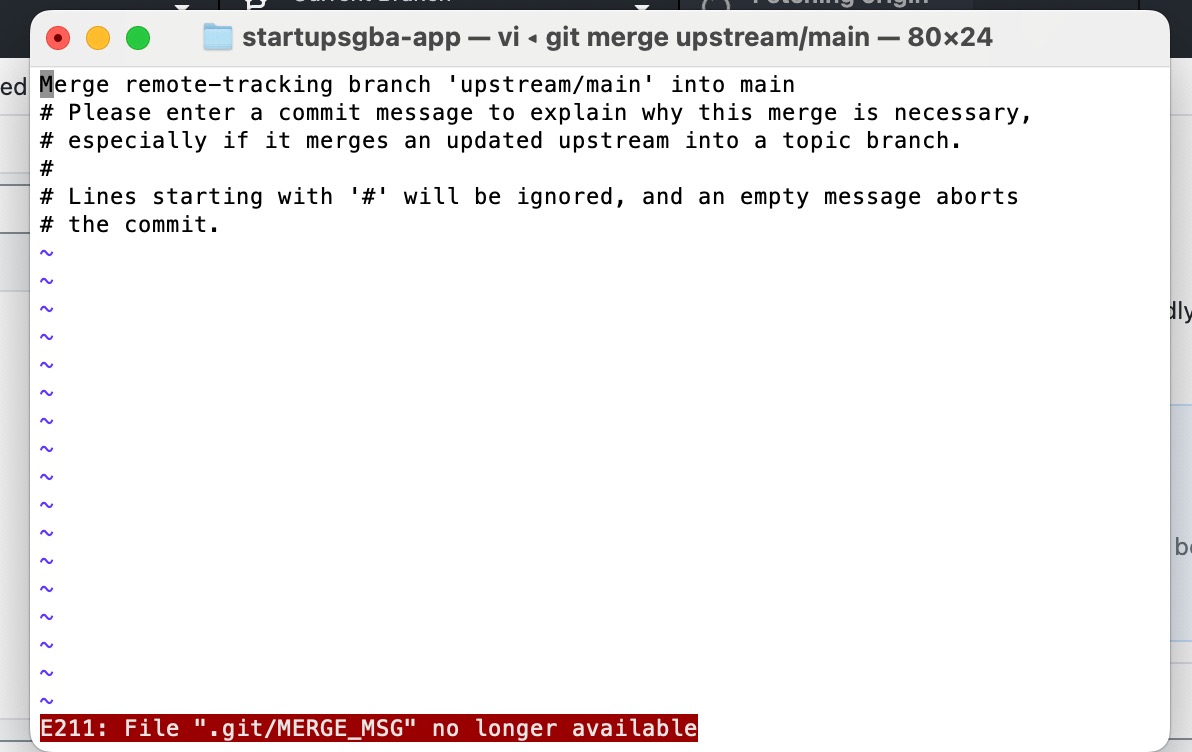
Manly's answer
that's because it's opening a vim session.
you need to:
scroll down using arrow keys below to the last line -> the commit
press escape key then press i
then type short message/description
press escape key then type :wq!
done
Now you're a vim ninja too! 🥷
Related
Backup GitHub — options & checklist · Duplicate a repo with full history · SSH + VPS for agents
Comments
Approved comments appear below. Log in once with GFAVIP — it applies across the whole site. GFAVIP login
View comments archive