n8n Cheat Sheet
More Information: n8n.io | GitHub
Follow: @data_popcorn | linktr.ee/datapopcorn
Version: v2025.04
Download this as infographic here.
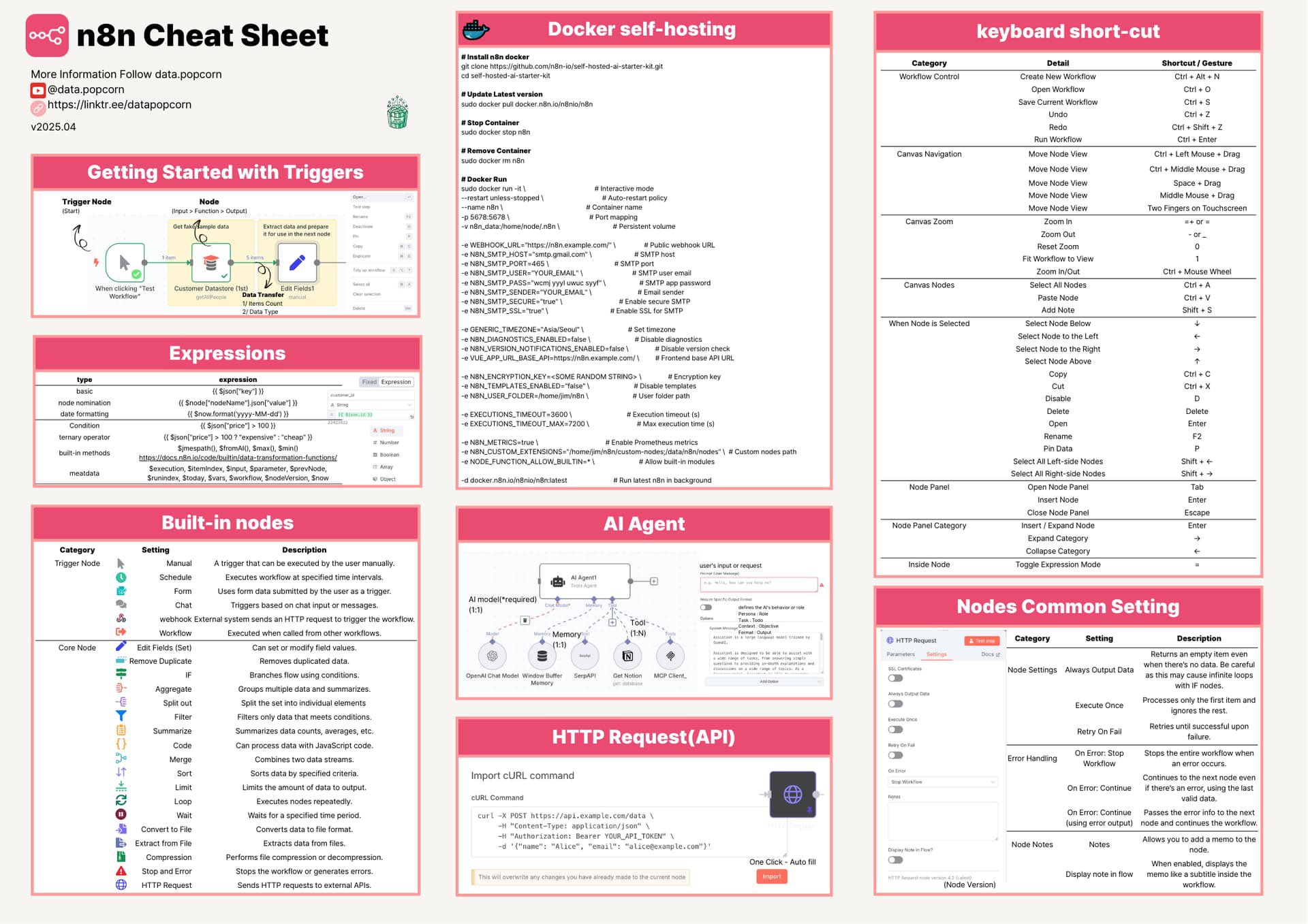
Install n8n (Docker Self-Hosting)
Clone Git: self-hosting-all-in-one
Latest Version: docker pull n8n/n8n:latest
Specific Version: docker pull n8n/n8n:0.181.0
Stop Container: sudo docker stop n8n
Remove Container: sudo docker rm n8n
Docker Run:
- docker run -d —restart unless-stopped —name n8n -p 5678:5678 -v n8n_data:/home/node/.n8n docker.io/n8n/n8n
Interactive Mode: docker run -it —name n8n -p 5678:5678 -v n8n_data:/home/node/.n8n docker.io/n8n/n8n
Persistent Volume: docker volume create n8n_data
Getting Started with Triggers
A typical workflow in n8n consists of a trigger node followed by one or more action nodes. Here’s how it works:
- Start: Begin with a trigger node (e.g., a schedule or webhook).
- Get Input → Function → Output: Process the data with function nodes or other actions.
- Data Transfer: Use nodes like HTTP Request to send or receive data.
- When Clicking “Test Workflow”: Test the workflow to see the data flow through the nodes.
Trigger Examples:
- Webhook URL: WEBHOOK_URL=“https://n8n.example.com/webhook/123”
- SMTP Host: N8N_SMTP_HOST=“smtp.example.com”
- SMTP Port: N8N_SMTP_PORT=587
- SMTP User: N8N_SMTP_USER=“your_user@example.com”
- SMTP Password: N8N_SMTP_PASS=“your_password”
- SMTP SSL/TLS: N8N_SMTP_SSL=“true”
- Time Zone: N8N_TIMEZONE=“Asia/Seoul”
- Disable Diagnostics: N8N_DIAGNOSTICS_ENABLED=false
- Disable Base URL: N8N_DISABLE_BASE_URL=“true”
- Encryption Key: N8N_ENCRYPTION_KEY=“SOME_RANDOM_STRING”
- User Folder: N8N_USER_FOLDER=“/home/n8n”
- Execution Timeout: EXECUTIONS_TIMEOUT=3600
- Max Execution Time: EXECUTIONS_MAX_TIMEOUT=7200
- Prometheus Metrics: N8N_METRICS=“true”
- Custom Extensions: N8N_CUSTOM_EXTENSIONS=“/home/n8n/custom”
- Custom Path: N8N_CUSTOM_PATH=“/data/n8n/n8n/custom”
- Run Latest in Background: docker run n8n/n8n:latest
Expressions
Expressions in n8n allow you to dynamically reference data from previous nodes. Here are some examples:
- Basic: {{ $node[“Snowflake”][“json”][“id”] }}
- Formatting: {{ $node[“Snowflake”][“json”][“price”] * 100 }}
- Conditional: {{ $node[“Snowflake”][“json”][“price”] > 100 ? “expensive” : “cheap” }}
- Built-in Methods: {{ $node[“Snowflake”][“json”][“data”].map(item => item.id) }}
- Metadata: {{ $execution.id }}, {{ $workflow.name }}
- Execution: {{ $execution.resumeUrl }}
- Object: {{ $json[“key”] }}
- Number: {{ 1 + 2 }}
- String: {{ “Hello” + ” World” }}
Built-in Nodes
Category
Description
Trigger
Executes workflows at specified time intervals.
Manual
Manually trigger a workflow.
Schedule
Runs workflows on a set schedule.
Form
Collects user input via forms.
Chat
Triggers based on chat or messages.
Webhook
Receives data from external systems via HTTP.
Workflow
Executes when called from other workflows.
Core Nodes
Description
Edit Fields (Set)
Sets or modifies field values.
Remove Duplicates
Removes duplicated data entries.
IF
Branches flow using conditions.
Aggregate
Groups multiple data items.
Split Out
Splits data into individual elements.
Filter
Filters data that meets conditions.
Summarize
Summarizes data counts, averages, etc.
Code
Runs custom JavaScript code.
Merge
Combines two data streams.
Sort
Sorts data by specified criteria.
Limit
Limits the amount of data to output.
Loop
Executes nodes repeatedly.
Wait
Pauses execution for a specified time.
Convert to File
Converts data to a file format.
Extract from File
Extracts data from files.
Compression
Compresses or decompresses files.
Stop and Error
Stops the workflow or generates errors.
HTTP Request
Sends HTTP requests to external APIs.
AI Agent
The AI Agent in n8n processes user requests using predefined tools and memory. It includes:
- Agent Model: Choose the AI model for processing.
- User Input/Request: The input provided by the user.
- Memory: Stores past interactions for context.
- Tools: Predefined actions the agent can perform.
- MCP (Multi-Chain Prompting): Guides the agent through complex tasks.
- Persona Data: Customizes the agent’s behavior or role.
- External Chat Model: Integrates with external chat models.
- Memory Buffer: Manages memory for the agent.
- Agent Context: Provides context for the agent’s actions.
HTTP Request (API)
Make HTTP requests to external APIs using the HTTP Request node:
Import cURL Command:
curl —request GET —url ‘https://api.example.com/data’ —header ‘Authorization: Bearer YOUR_TOKEN’ —header ‘Content-Type: application/json’ —data ’{“name”:“Alice”,“email”:“alice@example.com”}‘
Nodes Common Settings
Category
Setting
Description
Parameters
Always Output Data
Returns an empty event even if there’s no output, useful for infinite loops with IF nodes.
Execute Once
Processes only the first item and ignores the rest.
Retry on Fail
On Error Stop
Stops the workflow on error.
On Continue
Retries the node on error, using the last valid data.
Error Workflow
Continues to the next node even on error, passes error info to the next node.
Note
Display Note in Flow
Allows you to add a memo to the node when enabled.
One Click Auto Fill
Displays the note as a subtitle inside the workflow.
Keyboard Shortcuts
Category
Action
Shortcut/Gesture
Control
Create New Workflow
Ctrl + N
Open Workflow
Ctrl + O
Canvas
Save Canvas
Ctrl + S
Redo
Ctrl + Z
Canvas Navigation
Run Workflow
Ctrl + Shift + Z
Move Node View
Ctrl + Left Mouse + Drag
Canvas Nodes
Move Node View
Ctrl + Middle Mouse + Drag
Move Node View
Space + Drag
Canvas Zoom
Zoom In
+ or -
Zoom Out
Ctrl + Mouse Wheel
When Node is Selected
Add Note
Ctrl + V
Paste Note
Shift + S
Node Operations
Select Node Below
↓
Select Node to the Left
←
Select Node to the Right
→
Select Node Above
↑
Copy
Ctrl + C
Cut
Ctrl + X
Delete
Delete
Open
Enter
Panel Operations
Select All Left-side Nodes
Shift + ←
Select All Right-side Nodes
Shift + →
Insert Node
Tab
Close Node Panel
Escape
Expand Category
→
Key Functions for Growth Hacking with n8n
Here’s a cheat sheet list of ways to leverage n8n for growth hacking strategies:
Function
Description
Automate Lead Generation
Use Webhook and HTTP Request nodes to scrape leads from platforms like LinkedIn or Twitter, then store them in a CRM like HubSpot.
Social Media Posting
Schedule posts across multiple platforms (e.g., Twitter, Instagram) using the Schedule node and HTTP Request to APIs.
Email Campaign Automation
Trigger personalized email campaigns via SMTP nodes when users sign up or perform actions, integrating with tools like Mailchimp.
Competitor Analysis
Monitor competitors by pulling data (e.g., pricing, posts) from their websites or APIs using HTTP Request, then analyze trends with Code nodes.
Referral Program Tracking
Track referrals by setting up a Form node to collect user data, then use IF nodes to reward users via email or notifications.
Dynamic Content Personalization
Use expressions and Edit Fields nodes to personalize content for users based on their behavior or demographics.
A/B Testing Automation
Run A/B tests by splitting traffic with IF nodes, then use Summarize nodes to analyze results and optimize campaigns.
Customer Feedback Loop
Collect feedback via Form nodes, process it with AI Agent nodes for sentiment analysis, and send follow-ups via email.
Viral Loop Automation
Create viral loops by triggering invites to new users via email or SMS when a user completes an action, using Loop and Wait nodes.
SEO Monitoring
Use HTTP Request to pull keyword rankings or backlinks from SEO tools, then set alerts via email or Slack for changes.
Comments
Approved comments appear below. Log in once with GFAVIP — it applies across the whole site. GFAVIP login
View comments archive